
Smart home and building
ExoHome
A white-label application for connected consumer and building devices such as thermostats, air conditioners, fans, and lights. It covers device firmware, a branded mobile app, and a web portal for managing products and devices.
Existing ExoHome customers and anyone with questions about it can contact our team.
How ExoHome works
ExoHome is modular, so a product company can bring its own devices and brand while Exosite runs the cloud application.
Built for customization
Use your own hardware, choose from several Wi-Fi module options, adjust the included firmware, and brand the mobile app.
Quick to deploy
The application deploys in under an hour and ready-made devices can be connected in a day.
No in-house cloud team needed
No large up-front cost, long development cycle, or DevOps team to run the cloud side.
Features
Codeless UI customization
Change the registration flow, welcome email, page styles, and app theme through configuration.
Device and user management
Manage end users, the devices they own, and the product lines they belong to.
Device sharing
Owners share devices with up to 10 family members or guests by SMS or email.
Device groups
Control several devices at once, such as every light in a room.
Automatic scheduling
Set when and how a device runs, with up to 10 schedules per device.
Admin portal
Web portal for theming, product lines, connectivity status, firmware versions, and troubleshooting.
The mobile app
End users get an iOS and Android app branded as your product. Here is what they do in it.
- 01
Sign up and add a device
Users create an account, connect to the device's access point, and enter their Wi-Fi details. Provisioning typically takes under a minute.
- 02
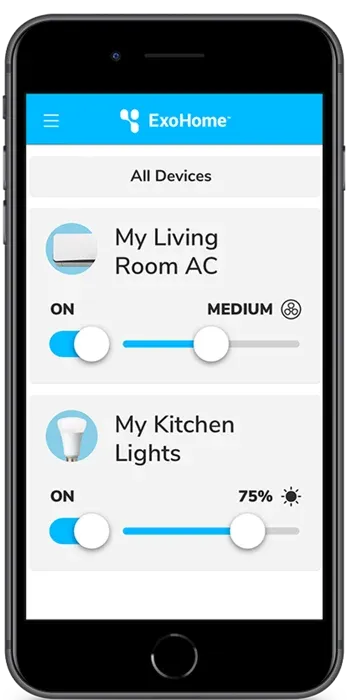
Control from the home dashboard
Each device appears as a compact control (power and temperature for an HVAC unit, for example) that expands to show modes, settings, and sharing.
- 03
Schedules, groups, and sharing
Users create schedules, organize devices into groups by dragging them between lists, and invite family members to control shared devices.
- 04
Device settings
Owners rename devices, view model and serial numbers, run over-the-air software updates, and remove devices.
Smart home integrations
ExoHome devices work with voice assistants and home automation services, so users can control them hands-free and connect them to other apps.
- Amazon Alexa
- Google Home
- IFTTT
- SmartThings
ExoHome Pro with ExoSense
ExoHome Pro runs on ExoSense, Exosite's condition monitoring application, for data analytics across a fleet of smart home devices and for supervisory monitoring and control.
Questions about ExoHome?
Existing customers and anyone evaluating ExoHome can reach our team.