
June 22, 2021
Product Updates: Timeout Rules Give ExoSense a Third State
By Mike Aanenson · 1 min read · Product
A pump that stops sending data isn’t the same situation as a pump sending a bad reading, and treating them the same way - or not distinguishing them at all - hides a real question: is the equipment actually fine and just disconnected, or is something worse going on?
Timeout Rules
Timeout Rules watch time since the last value, not the value itself. When a configured interval passes without new data, the signal enters a distinct Timeout state - separate from whatever Warning or Critical status it last reported. Any new value immediately exits the timeout, and both entering and leaving generate their own events, so a connectivity gap shows up in the log as exactly what it was instead of getting lost inside a value-based rule’s history.
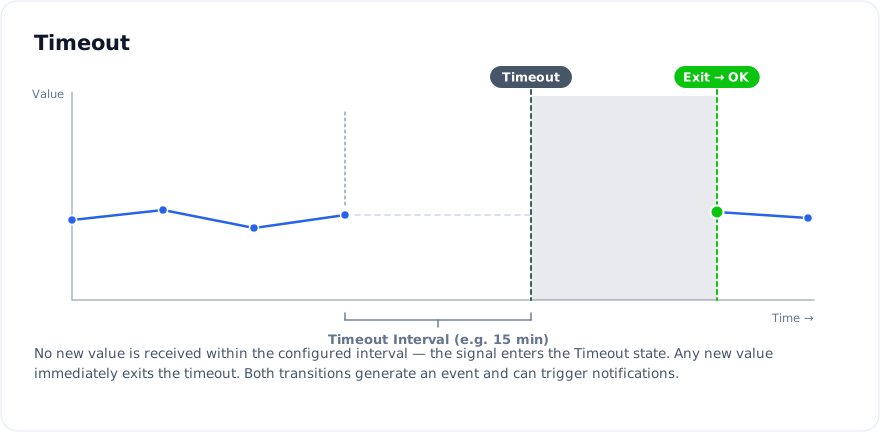
The minimum timeout interval is one minute, short enough to catch a real connectivity drop on a device that reports frequently, without false-triggering on a device that only checks in every so often by design.

Timeout status shows up as its own idea in several later features - it’s part of what the custom email domain update improved visibility for, and a state a Current Value panel can be configured to reflect. This release is where that state was born.
Also new in this release: Multi-group Users, letting a single user account be assigned to more than one parent group.
Full release notes: 2021 archive (opens in new tab), v2.36.0. Rules documentation: Rules - Exosite Documentation (opens in new tab).
Trying to tell “disconnected” apart from “actually broken”? Schedule a Demo.